We’re introducing
Marketplace Earning Dashboard
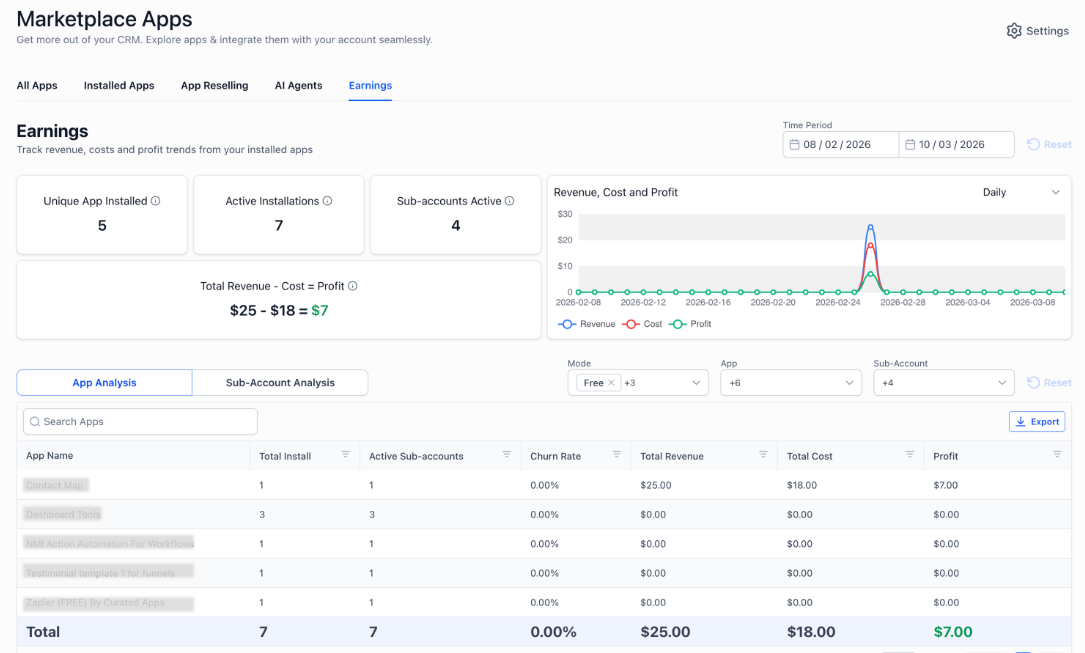
, a new analytics experience that gives accounts clear visibility into app installs, revenue, costs, and profit, along with account–level contribution.This dashboard helps accounts move from manual tracking and guesswork to data-driven decisions about app usage, ROI, and client value.
What’s New
Account-Level Financial Visibility
Accounts can now view:
- Total revenue generated from Marketplace apps
- App-related costs
- Net profit (Revenue – Cost)
- Adoption metrics across accounts
- Metrics are filterable by time period and update based on the selected range.
App Adoption Metrics
The dashboard includes high-level adoption indicators, such as:
- Unique Apps Installed – Number of distinct apps currently installed across all accounts
- Active Installations – Total count of active app installs across accounts
- Active Accounts – Number of accounts with at least one active app install
- These metrics help accounts understand how widely apps are being used across their client base.
Account Revenue Breakdown
Accounts can drill down to see:
- Revenue contribution by individual accounts
- Which clients generate the most (or least) value from apps
- Revenue distribution for a selected app or time window
This enables better client prioritization and more informed pricing or upsell decisions.
*
Total Revenue – Cost
on dashboard reflects the total revenue generated (from both accounts) minus the cost paid to the developer. For account apps, revenue and cost are equal. However, for account apps where reselling is enabled, revenue can be greater than cost, resulting in a margin. Account breakdown gives insight into total account revenue, cost and profit.*Time-Based Insights
Accounts can filter data using:
- Predefined ranges (Last 30 Days, This Month, etc.)
- Custom date ranges
- Visualizations automatically adjust granularity (daily, weekly, monthly) based on the selected time window, ensuring trends are easy to interpret.
Data Export
Admins can export data. Exports respect all applied filters and can be used for offline analysis or sharing with stakeholders.
How to enable:
Labs >> Account>> Marketplace Earnings dashboard. This will add earnings as an additional module in the Marketplace product page.
Why It Matters
As Marketplace adoption grows, accounts need more than install counts—they need financial clarity.
This dashboard enables accounts to:
- Understand the real value delivered by Marketplace apps
- Identify high-ROI tools and underperforming installs
- Make confident decisions around app usage, promotion, and client strategy
- Reduce manual tracking and reporting overhead
This lays the foundation for a more data-driven Marketplace experience.
Preview:
Was this article helpful?
That’s Great!
Thank you for your feedback
Sorry! We couldn't be helpful
Thank you for your feedback
Feedback sent
We appreciate your effort and will try to fix the article