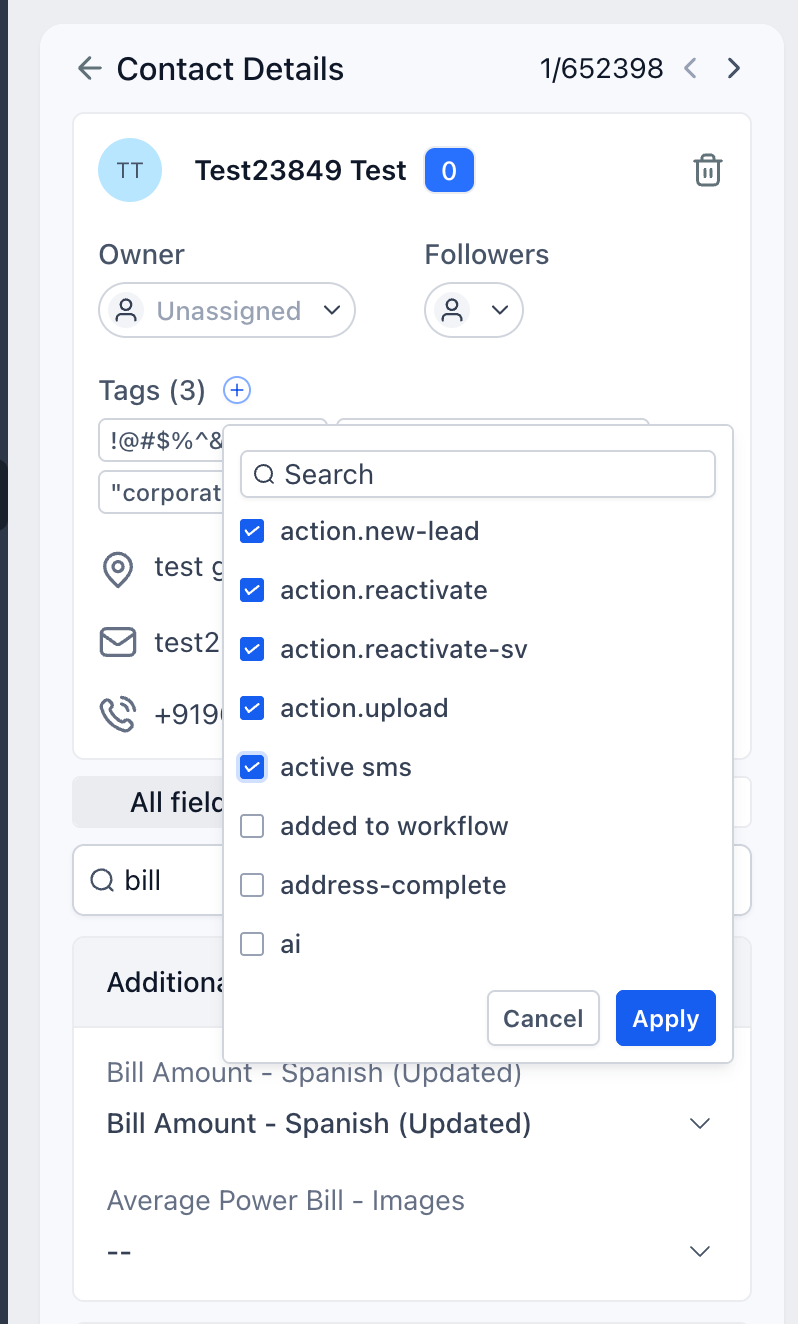
We’ve improved the tag management experience in the Contacts module by introducing double confirmation for adding and removing tags. Previously, selecting or deselecting a tag would instantly apply the change and could unintentionally trigger workflows. With this update, users now have more control and can confidently manage tags without accidental workflow executions.
What’s new?
- Added an Applybutton for tag changes
- Added a Cancelbutton to discard unintended changes
- Introduced double confirmation for both: adding new tags and removing existing tags
- Prevented accidental workflow triggers caused by unintended tag updates
- Improved overall safety and accuracy while managing contact tags
How it works?
- Open the tag dropdown for a contact
- Select/deselect the tag(s) you want to add/remove
- The Applybutton becomes active
- Click Applyto confirm the adding/removal of tag(s)
- Click Cancelif you do not want to proceed
This additional confirmation step ensures that workflows are triggered only after intentional tag updates.
What’s next?
We’re continuing to enhance the tag management experience with upcoming improvements, including:
- Tag categories for better organization
- Tag colors for improved visibility and identification
- Category and color visibility directly inside the tag dropdown
- Selected tag counts displayed for each category
These enhancements will make tag management more intuitive, organized, and scalable for growing businesses.
Was this article helpful?
That’s Great!
Thank you for your feedback
Sorry! We couldn't be helpful
Thank you for your feedback
Feedback sent
We appreciate your effort and will try to fix the article